
I’ve been meaning to create some fabric designs ever since I signed up for the Spoonflower beta. I finally got around to it, and here is my first attempt! The Space Robots (from the Robot Party) return!
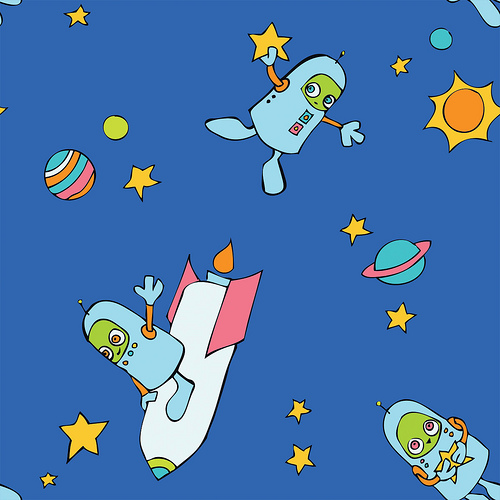
It took some trail and error to get the pattern like i wanted it, so here’s how I did it. (This is all done in Photoshop, but if you don’t have photoshop, here’s a great tutorial on how you do the same thing on paper!)
-I drew the elements of the design in pen, then scanned it. I used Illustrator’s Live Trace function with the Comic Art preset to get the lines like i wanted them, then moved it back into Photoshop.
-Then I used my new favorite technique to pull the line art to a separate layer.
-I created a new 8″x8″ image in photoshop because that was my desired dimensions. The plan here is to copy/paste the individual design element line art into separate layers, for ease of placement.
-To get the repeat pattern, I took one of the robots and a few of the stars, and laid them out in the center of the new image. I merged those line art layers into a single line art layer when i was satisfied with the placement. Then I used the Offset filter in Photoshop (horizontal & vertical set to 1/2 the width/height of the full image, wraparound checked*). That moves those images to the corners. Then I positioned the rest of the robots and stars in the center.
-I then merged all of the line art layers, leaving me with a background layer, and a line art layer. I created a new layer for the colors, and put that in the middle. Then I colored the image.
While in beta, only I can order the fabric, but if anyone wants some, let me know and I’ll order it for you!
It makes a nifty tiled desktop wallpaper too!
*credit: I used this tutorial to figure out how the offset filter worked.